 English




 For children and babies
  Electronics
  Fan goods and merchandise
  Tools and garden equipment
  Home and garden
  Bags and travel equipment
  Sports and active recreation
  Video games and consoles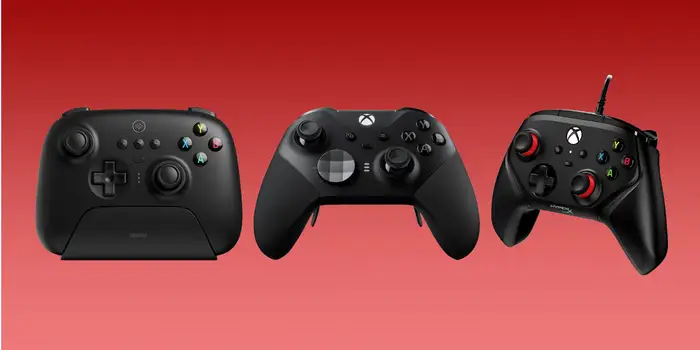
1. Xbox Elite Wireless Controller Series 2. Best overall controller.

SPECIFICATIONS – Weight: (345g) (+/-15g). Connectivity: USB Type-C, Bluetooth. 2.4GHzFeatures: 3-step trigger modes, replaceable thumbsticks, paddle switches. Battery: Internal Rechargable Battery (40 Hours).
REASONS TO BUY – Lots of customization options. Detachable Charging Dock via USB-C . Bluetooth-enabled.
REASONS TO AVOID – Heavy compared to most controllers. Seriously expensive.
The Microsoft Elite Series 2 controller remains our pick as best gaming controller, and if you use one more than ten minutes, you’ll understand why we have it at the number one spot. Everything about the Series 2 screams luxury. The customization options give you an unparalleled level of control over your gameplay. Being able to tweak all aspects of the controller, like d-pads, shift paddles, and joystick tension, is an absolute godsend. It comes with a bunch of custom bits: 6 thumbsticks, 2 d-pads (cross-shaped and faceted), 4 rear pedals, and one tool for adjustable thumbstick tension. The returning hair-trigger locks are still among my favorite things about Elite. For those who haven’t used them, they control how far you need to pull the trigger, so there’s no wasted effort or time in competitive shooters, where milliseconds matter. The four additional back paddles are a neat feature, too and can make for some interesting controller layouts. Never want to take your thumbs off of the thumbsticks? Simply assign the face buttons to the back paddles and you’re good to go.
2. Xbox Core Wireless Controller. Best budget controller.

SPECIFICATIONS – Weight: (281g). Connectivity: Xbox Wireless; Bluetooth. Features: Hybrid D-pad, Textured Grip, Share button. Battery: 2x AA/recharchable batteries.
REASONS TO BUY – Affordable. Comfortable. Officially supported by most games. Share Button.
REASONS TO AVOID – No internal battery.
This controller retains many of the features we loved about the original. It maintains the overall comfortable design and includes texturized rubber grips that provide a great feel in your hands. Similar to its predecessor, it boasts a vastly superior d-pad that you won’t hesitate to use in fighting games and platformers, taking inspiration from the Xbox One Elite Series controllers. You might have noticed a new button in the controller’s center—a much-requested Share button that allows you to capture screenshots and gameplay footage without delving too much into the menus. However, honestly, that’s a minor aspect when it comes to gaming.
3. Turtle Beach Stealth Ultra. Best, “Hall Effect”, controller.

SPECIFICATIONS – Weight: (246g). Connectivity: USB Type-C, Xbox Wireless, Bluetooth. Features: Built-in display, no-drift thumbsticks, tactile microswitches, (3m) cord. Battery: Internal Rechargable. Battery (30 Hours).
REASONS TO BUY – No-drift thumb sticks. Customisable without software. Tactile microswitches.
REASONS TO AVOID – It’s big. The RGB seems pointless. Phone app sucks.
If stick drift drives you crazy, look right here. The Turtle Beach Stealth Ultra promises to remove that particular blight thanks to its Hall effect thumb sticks. It features friction-less, contact-less sensors, and will never suffer the vagaries of stick drift. This is a controller that looks and feels like it goes a long way to justifying its steep 250Euro asking price. It’s got an LCD display that’s useful for monitoring and adjusting its various functions. And it can display social media notifications if that’s of interest to you. Oh, and it’s got RGB. Of course. It’s a wireless affair with an inbuilt lithium ion battery, which can be charged via the included USB cable. It connects via 2.4GHz wireless or Bluetooth. Turtle Beach claims the unit can run for up to 30 hours depending on the power mode you use. Flashy stuff aside, the Stealth Ultra’s claim to fame is its sticks and buttons. It features microswitches under the d-pad and face buttons, giving it a mechanical tactility. The concave d-pad isn’t swappable, but the microswitches on the Stealth Ultra improve the experience a great deal. It’s ‘clicky’ feel gives it a precision that’s often missing from cheaper controllers. The left and right triggers have adjustable depths, while the two switches on the back of the controller can toggle between a default deep stroke and a much more shallow stroke. The Stealth Ultra is highly configurable. Assigning functions to the P1-P4 switches in each of the ten onboard profiles is painless, as is adjusting sound settings on a per-profile basis. The latter includes not only mic monitoring and volume, but also some EQ options. To access these functions there’s an extra button beneath the usual Xbox share button which toggles the screen between controller use and menu use. Xbox share button which toggles the screen between controller use and menu use. If you’re going to spend the big bucks on a gaming controller and you expect it to take a lot of punishment, Hall effect sticks are where it’s at. Sure, it’s pricey, but its big price tag is amply justified, thanks to its no-drift stick technology, brilliant microswitches, paddles, and on-the-fly customization capabilities.
4. Sony DualSense Wireless Controller. The best symmetrical controller.

SPECIFICATIONS – Weight: (280g). Connectivity: USB Type-C, Bluetooth. Features: Touchpad, haptic triggers. Battery: Li-Ion (6-12 hours).
REASONS TO BUY – Super accurate thumbsticks. Adaptive Triggers. Haptic Rumble
REASONS TO AVOID – Feature support limited on PC. Battery life isn’t amazing.
The PlayStation 5 DualSense has a “you have to touch it to believe it” quality, thanks to its haptic motors and “Adaptive” triggers, which can provide resistance under your finger. For example, firing a bow can actually feel like firing a bow. The rumble feedback is also the best and most nuanced we have ever experienced in a controller. It truly lives up to the praise it receives. The downside is that games need to be programmed to take advantage of them, and only a few do. However, Steam already offers full support for the controller, so it’s relatively easy to plug in and use like any other gamepad. It is slightly less comfortable than the Xbox Series X controller and not as straightforward to use in non-Steam games. However, if you prefer Sony’s analog stick layout or enjoy gyro aiming, this is the controller to go for. The DualSense does not have official PC drivers, but that is not a major issue, as Steam makes it incredibly easy to use the controller via USB and Bluetooth. The DualSense uses the older DirectInput API instead of the more widely supported XInput, meaning many games may not instantly recognize it. By enabling ‘PlayStation Configuration Support’ in Steam’s controller settings, your controller will work with most games. The relationship between PC and DualSense is complex. Still, it has become slightly simpler now that we can update the controller firmware directly through our PCs instead of having to connect it to a PS5. Simply download the ‘Firmware updater for DualSense wireless controller’ tool from the official PlayStation site, follow the instructions, plug in your DualSense via a USB cable, and you’re ready. Nevertheless, the PS5 DualSense remains an incredibly well-built controller and is as responsive as one could wish. If you dislike the offset sticks of the standard Xbox layout, this is as about as good as PlayStation gamepads get—there is that ludicrously expensive Edge controller, but that’s really not an option on a budget.